| |
Review and how it works

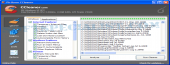
CCleaner comes as a freeware system optimization and privacy protection instrument.
CCleaner cleans unused files left on the system thus making Windows to work quicker and freeing up important hard drive space.
This program eradicates traces of the online activities e.g. the Internet history.
The CCleaner (formerly Crap Cleaner) has been designed to be secure to operate with it.
This application has different levels of verifications to make sure that it will not clean up information or documents that you may still need.
For the privacy protection a built-in tool offers safe file erasing. By overwriting the files before deleting them, it becomes unfeasible to recover the data.
Beyond cleaning up old files and settings left from standard Windows components, CCleaner can also delete temporary files and recent file lists for numerous tools, including:
Firefox, Opera, Safari, Media Player, eMule, Kazaa, Google Toolbar, Netscape, Microsoft Office, Nero, Adobe Acrobat Reader, WinRAR, WinAce, WinZip as well as others...
Comes with a good Registry Cleaner of real help to repair errors and system inconsistencies.
What is new?
- Updated Index.dat cleaning in Vista.
- File scanning performance enhancements on NTFS drives.
- Enhanced exception handling methods.
- Fixed IE cache directory location bug.
- The uninstaller utility now is able to export foreign languages correctly.
- Repaired a bug where IE cache content could be incorrectly listed.
- improvements added to secure file deletion.
- Tweaks to Uninstall utility's detection engine.
- Minor GUI changes.
Brief details
Internet Explorer Cleaner: Clean Up Temporary files, URL history, cookies, Autocomplete form history, index.dat.
Firefox: erase Temporary files, URL history, cookies, download history.
Opera browser: Clean Temporary cache, URL history, cookies.
Windows: delete Recycle Bin, Recent Documents, Temporary and Log files.
Delete the cache from almost any web browser.
Registry cleaner: it has complex tools to delete unused and old entries, like File Extensions, ActiveX Controls, ClassIDs, ProgIDs, Uninstallers, Shared DLLs, Fonts, Help Files, Tool Paths, Icons, Invalid Shortcuts and the like... also provides the user with an indispensabile backup feature in the case of errors or accidents.
Third-party application cleaner: Deletes temp files as well as recent file lists (MRUs) from lots of apps like Media Player, eMule, Kazaa, Google Toolbar, Netscape, MS Office, Nero, Adobe Acrobat, WinRAR, WinAce, WinZip and lots of more...
How to install & uninstall CCleaner - system requirements
Nothing special to install, use or uninstall it.
|
|