| |
Review and how it works

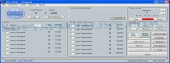
Job Timer 3 acts as a petite Time Keeper to manage time spent on a job.
Job Timer figures out the cost and has an integrated Invoice.
The user will click start, and done when he finishes. The program will even print an invoice with the costs.
The users will also find a section for Timed Services in Job Timer 3. This lets them to manage time on various services for example their prices.
It comes with the power to enter many tasks.
Job Timer 3 contains a countdown timer, a Count Up Timer, Alarm, Break Alarms, Ergonomic Feature.
Helped by Job Timer, the user may view Project and Daily, Weekly or monthly Reports regarding various performed jobs.
It makes possible for its users to manage the invoices, search by customer or task and see how much was done.
This utility saves all the invoices and enables users to know when they are due. Time, Reports all aspects of the project.
Download and Check out this new Edition of Job Timer. The users will find that it will be an ideal asset to the work day.
Brief details
Stores Customer details.
Has a countdown timer, a count up timer and alarm.
It may organize all your invoices.
Search by task or person.
Track with Job Timer your invoices to know the costs.
How to install & uninstall Job Timer 3 - system requirements
Job Timer works with 1500mhz Processor 512mb RAM
|
|