| |
Review and how it works

Tempo was built as an electronic reminder which tools under Windows (32 bits) and shows notes at will.
Like Post-It Notes block but with time management. Once installed, this instrument starts on the fly with Windows and is summarized by an animated sand-glass in the task-bar of Windows.
Every control (buttons, drop-down list, and the like.) is equipped with a tip making it user-friendly. To generate a note double-click on the animated icon of it (sand-glass).
Size of notes may be changed and notes can comprise an alarm. The text zone is unrestricted and may be printed.
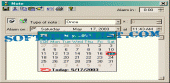
Trouble-free Alarm making use of the calendar. With "Type of note" you are able to define repetitive notes. The weekend is managed, practical for the office. With "Alarm in" you are able to recall your note in hours or minutes.
You may load MP3 file or even an executable file with the alarm. A list of notes may be consulted, with reference and access on every note. By default notes are sorted on dates.
They may be sorted on alphabetical or dates (up/down) order by clicking column titles. You are able to search for a text within notes, each notes with that text in will appear.
A visualization mode makes it possible to prevent unwanted modifications. It may be utilized in sequence, i.e. visualizing all the existing notes in continuation.
An multifaceted help file offers this application. There numerous others options... Take a look !
How to install & uninstall Tempo - system requirements
None
|
|