| |
Review and how it works

Entirely automated personal computer usage/Project tracking utility that surveys the time spent on the personal computer.
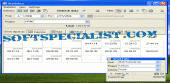
Work Time gathers statistics about projects you work on, accessed software, opened documents, visited web-sites and the time spent for every of these activities.
Work Time tracking is very precise and flexible: it may pause for the keyboard/mouse or screensaver inactivity, trouble-free change projects based on the active application/document, track individual software only and more.
WorkTime has informative reports that are good to analyze or bill the time: tables and graphical charts may be printed or exported to different types of formats. Reports are extremely customizable: projects, users, workstations may be grouped, filtered, compared. For instance, it is possible to see how much time has been spent working on each specific day, week, month on the whole and with specific utility.
WorkTime is a good combination of simplicity and usefulness; it suits both home users and large enterprise.
Home users - control how much time you spend browsing the web, checking emails, playing games or keep an eye on the kids with it Hidden mode.
Self-employed or contract workers - bill clients for the job, provide exact reports on how much time you spent working.
Tiny teams/large companies - deploy it on the workstations in the local network, gather statistics from the remote and laptop employees and output reports on the server.
What is new?
Major update for this program.
How to install & uninstall WorkTime - system requirements
A standard Windows PC
|
|