| |
Review and how it works

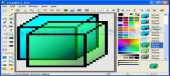
IconXP from Aha-soft helps you to edit icons and tailor the Windows appearance.
The tool can handle the new format introduced in Windows Vista (employs smooth transparency as well as various visual effects).
Operating with IconXP utility the user may make and edit icons in either standard or custom sizes, with color depths by 32-bit True Color with 8-bit alpha channel.
Several graphic tools are included: color replacer, color selector, spray can, pencil, brush, flood fill, text utility, line utility, rectangle, curve, ellipse, 3d frame.
Modifiers may be used in this tool to apply color gradients and chess fills. For Windows XP, the users acquire to add cool drop shadow and smooth effects.
The application can handle .ico, .ani, .cur, .wmf, .emf, .bmp, .jpg, .jpeg, .gif, .png, .xpm, .xbm, .wbmp, Mac OS icons and Adobe Photoshop .psd files.
The user may import photos from screen captures. Its modules will help you to import, export and change color palettes for photos.
IconXP helps you to change standard Windows icons, and tailor desktop attributes.
Operating with it it is possible to replace, colorize and save the pictures that Windows makes use to show several objects - My Personal Computer, Recycle Bin, Internet, Start menu items, drives, system directories and the private directories.
The user may hide or change shortcut overlays. This tool has commands that change the desktop icons size and color resolution, and rebuild the dedicated cache.
What is new?
Allows large WBMP pictures.
Brief details
Was made as an Icon editor and customizer.
May deal with smooth transparency from Windows Vista.
A way to add to cool drop shadow and smooth effects.
Tailor desktop icons and attributes to your taste.
Enables the user to export and import ICO, BMP, GIF, PNG, JPEG, CUR, ANI, WMF, PSD sorts.
How to install & uninstall IconXP - system requirements
It demands 16MB RAM, Pentium-133 MHz.
2MB Hard Drive to install it.
True Color video mode available.
|
|